
Moonlet

A live 3D drawing of a thought passing through an AI model: a row of layers, each a block of glass cubes under a starry night sky, each cube holding a real slice of the model's routing weights, its cells lit as the thought passes through, with six friendly characters — a T. rex with a pencil, a long-necked dinosaur in a striped scarf, an owl in a graduation cap with a diploma, a bunny reading a red book, a turtle with a backpack and an octopus in round glasses — who walk, waddle, hop and sidle the thought from layer to layer as you scroll, left to right, chatting as they go. Behind the cubes, cards about people from history drift past, from Euclid and Eratosthenes to Ada Lovelace, Alan Turing and Grace Hopper, each with one fact. Near the end they swirl, one after another, into one bright answer, which fills the screen and becomes the daylight of the page below. You can drag to turn the view, and tap a character to make it jump.

Tutoring for every age · In development

A tutor for every age, on a 16 GB MacBook Air.

Ornith-35B · 4-bit · about 19 GB on disk
MacBook Air · M5 · 16 GB memory · Streams

Homework help, a new subject or getting ready for college: name what you want to learn, and Moonlet plans the course, writes each lesson and quizzes you, with an open AI model running on your own device.

Every level, kindergarten to doctoral

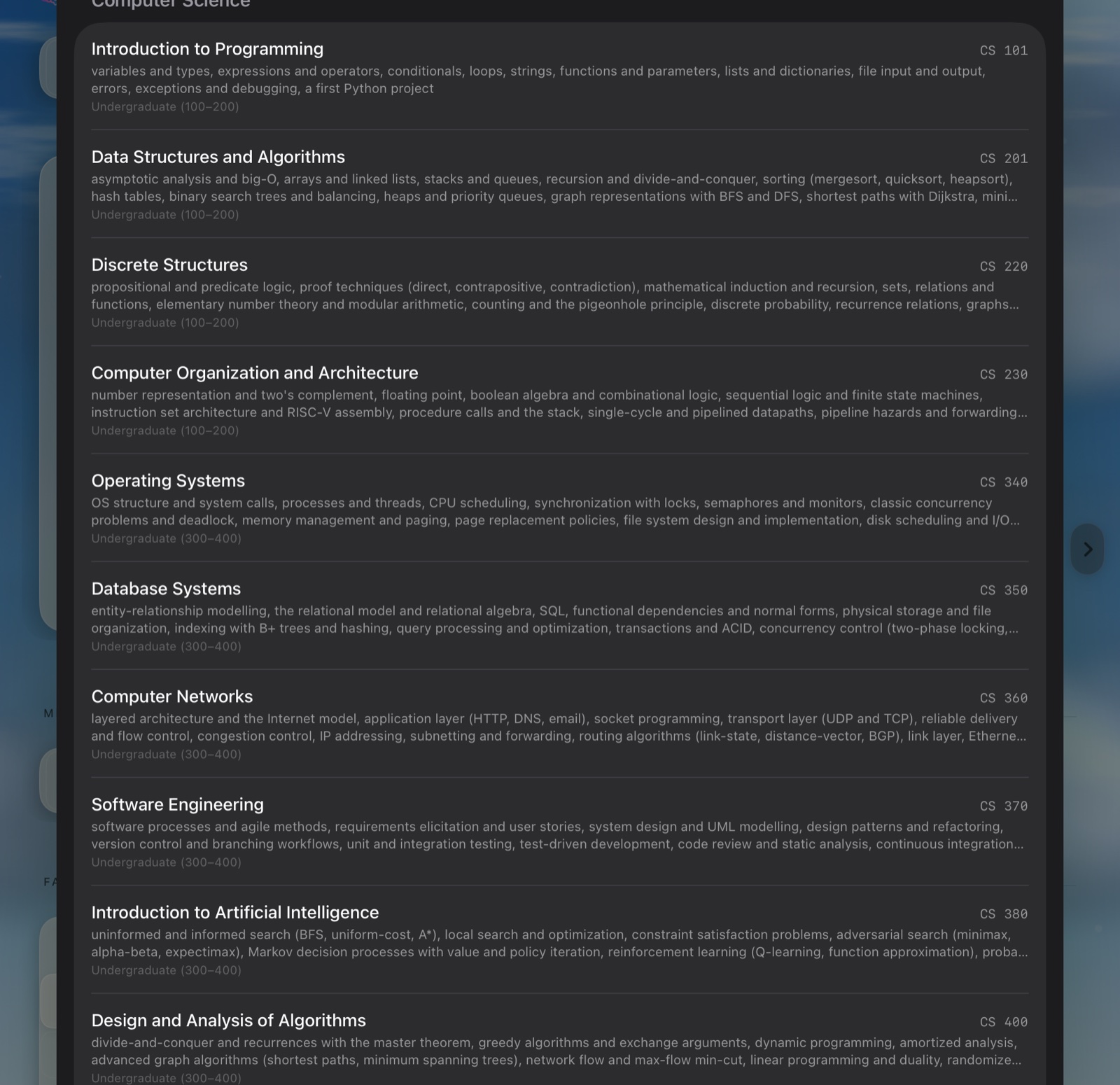
Name any course, or start from 304 college courses in 24 subjects.

See how it works

What Moonlet is

A tutor that lives on your Mac.

Moonlet runs an open model on your own Mac and builds a place to learn around it: courses, lessons, practice, and review that comes back when it’s due.

Ornith 1.5 arrives with one tap on Get Ornith, which checks each file as it downloads: a copy prepared for Moonlet’s engine, so there is nothing to convert. Other open models come from Hugging Face, chosen inside the app (on a family device, by a parent), and each is checked before it downloads: whether this engine runs it, whether it fits in memory, and whether it’s for students.

  1. 1Start a courseName it, pick a level. The tutor plans the term.
  2. 2The next lessonWritten when you reach it, with a live time estimate.
  3. 3Practice, then come backInstant drills, and topics that return when due.

In development for Mac, iPhone and iPad. Coming after that: Moonlet on Googlebook and Chromebook, and on NVIDIA GPUs through CUDA. Hear when it’s ready

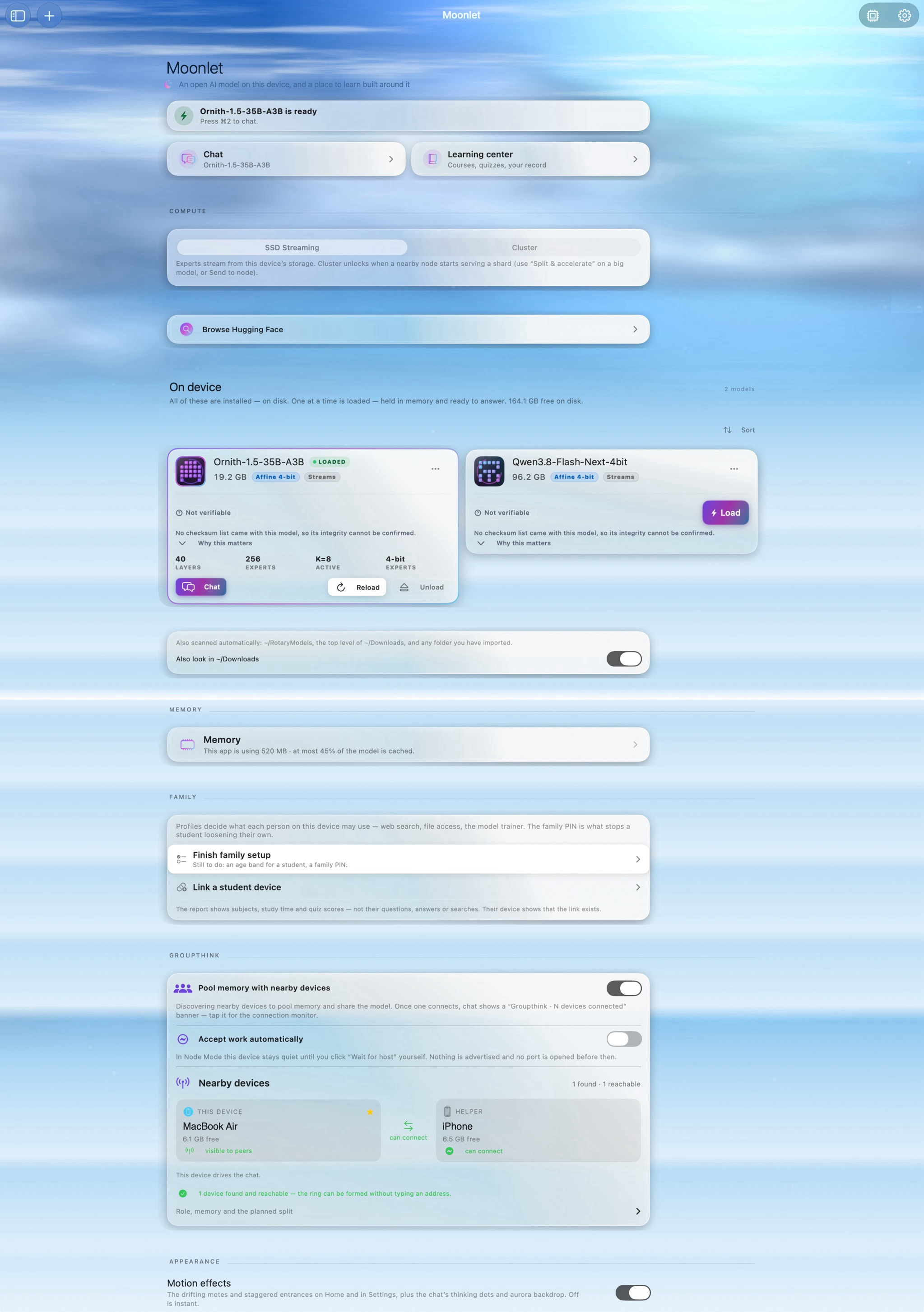
The whole of Home on a Mac, top to bottom: Ornith-1.5-35B-A3B is ready; Chat and the Learning center; Compute, SSD Streaming or Cluster; Browse Hugging Face; On device, Ornith-1.5-35B-A3B loaded at 19.2 GB and Qwen3.8-Flash-Next at 96.2 GB; Memory; Family, with Finish family setup and Link a student device; Groupthink, with nearby devices; and Appearance.
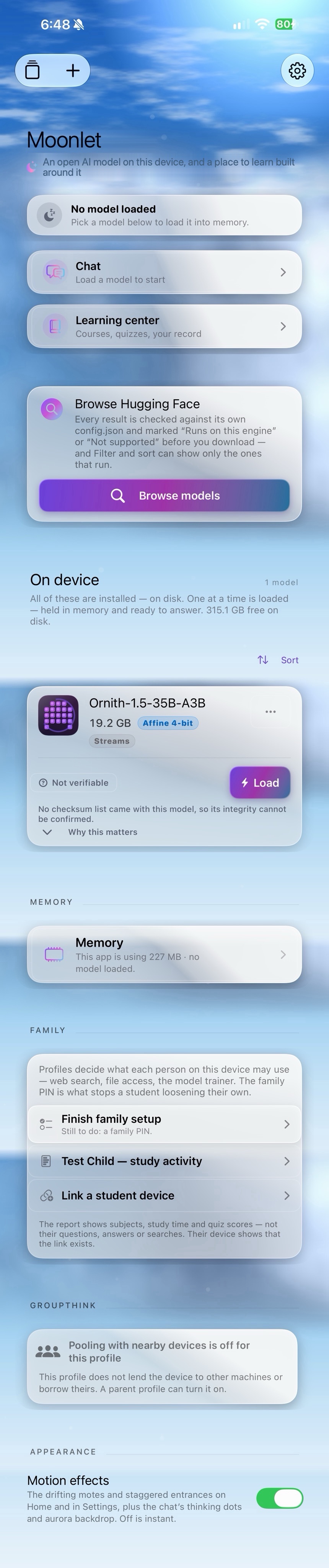
The whole of Home on an iPhone, top to bottom: no model loaded; Chat and the Learning center; Browse Hugging Face, whose results are marked Runs on this engine or Not supported before you download; Ornith-1.5-35B-A3B on the phone, 19.2 GB; Memory; Family, with a student’s study activity; Groupthink; and Appearance.

Home on a Mac and on an iPhone 17 Pro Max, each captured top to bottom.

On iPhone

Homework help that hands the problem back.

Student profiles start in homework mode, where the tutor is set up to guide rather than hand over the finished answer. It asks what they’ve tried, works one step at a time, and when they’re stuck shows the rule on different numbers before handing their own problem back.

In the recording, a student asks for the answer to 3/4 + 1/8. The tutor thinks it through first (“I need to help them work it out, not just give the answer”), explains why the bottom numbers have to match, and hands the next step back: what is the smallest number both 4 and 8 divide into?

  • On the phone itself. Ornith-1.5-35B-A3B, a 19.2 GB model, running on an iPhone 17 Pro Max and reading its experts from the phone’s storage. In this reply it wrote at 6.4 tokens a second.
  • It shows when the phone is warm. A status capsule above the message box shows the reply’s speed, length and how full the context is, at a glance. When the phone warms, its edge turns amber, then orange and red as it heats, with a word on what helps. Meanwhile the model uses fewer experts until the phone cools, and overnight lesson writing waits while it is hot.
The status capsule at the end of the reply, its edge amber: a speed line, 6.4 tok/s, 228 tokens, a thermometer reading Warm, and a ring showing 5% of the context used.
Recorded from the iPhone’s screen on a test student profile, at about 4× speed.

Open models

The models are open. The Mac is yours.

You choose the model. Moonlet runs open models from Hugging Face, such as Ornith from DeepReinforce, Gemma 4 by Google in a build packed for this engine, and Qwen3.8 Flash-Next from Qwen. Ornith 1.5, MIT-licensed by its makers, comes ready to run with one tap.

  • What runs. Mixture-of-experts models: the Qwen3.5 and Qwen3.6 family, Ornith among them; Gemma 4 from a build packed for this engine; Qwen3-Next, Qwen3 MoE and Qwen3.8 Flash-Next. Speeds are measured only for Ornith and Flash-Next.
  • Checked first. Before you download, each model is marked: Runs as-is, fits in memory or streams from disk, or Not supported. On a family device it’s also marked Family-safe, Not for students, or Parent decides.
  • For 16 GB or less. We suggest Qwen3.5/3.6-35B-A3B models, such as Ornith, for systems with 16 GB of memory or less.
  • What doesn’t. Models built on other designs, like Llama, are marked Not supported before you download, so none can load and answer wrongly. Gated repos can’t be downloaded: the app doesn’t sign in to Hugging Face.
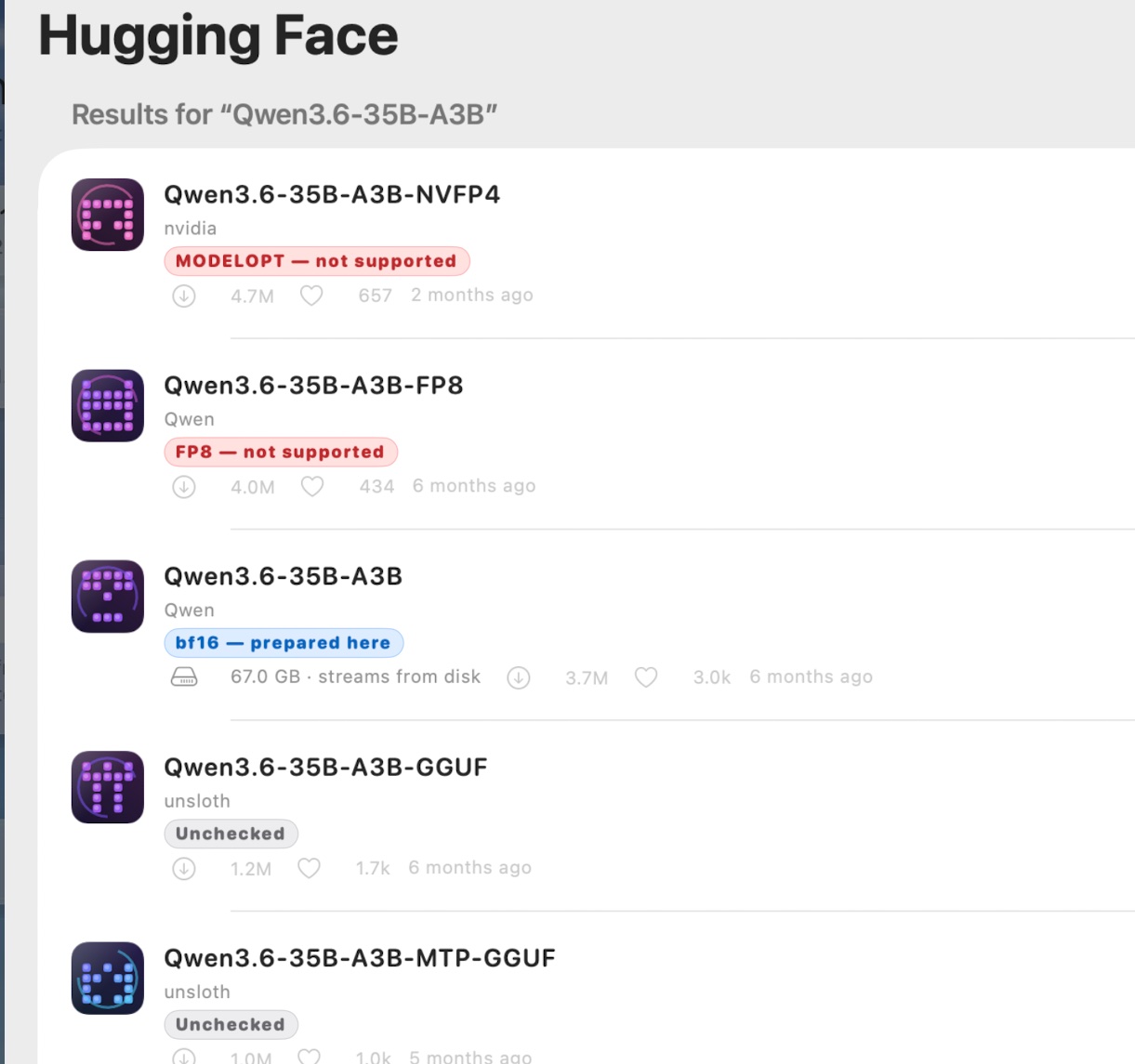
The Hugging Face browser on a Mac, with results for Qwen3.6-35B-A3B: NVIDIA's NVFP4 build is marked ModelOpt, not supported; Qwen's FP8 build is marked FP8, not supported; Qwen's own Qwen3.6-35B-A3B is marked bf16, prepared here, 67.0 GB, streams from disk; two GGUF builds from unsloth are marked Unchecked.
Searching for Qwen3.6-35B-A3B on a Mac. Each result is marked before you download it.

Will it run on mine?

A Mac
With Apple silicon (M1 or later, or the A18 Pro in MacBook Neo), on macOS 15 or later.
An iPhone or iPad
On iOS 18 or later, with 8 GB of memory or more.
Room for a model
About 20 GB free for Ornith, which is about 19 GB on disk.

Intel Macs, Windows and Android aren’t supported yet.

1Start a course

Say what you want to learn. The tutor plans the term.

Name what you want to learn and pick a level, anywhere from kindergarten to doctoral. At university level you can also start from a catalog of 304 college courses in 24 subjects. The tutor plans the outline, then writes each lesson as you reach it.

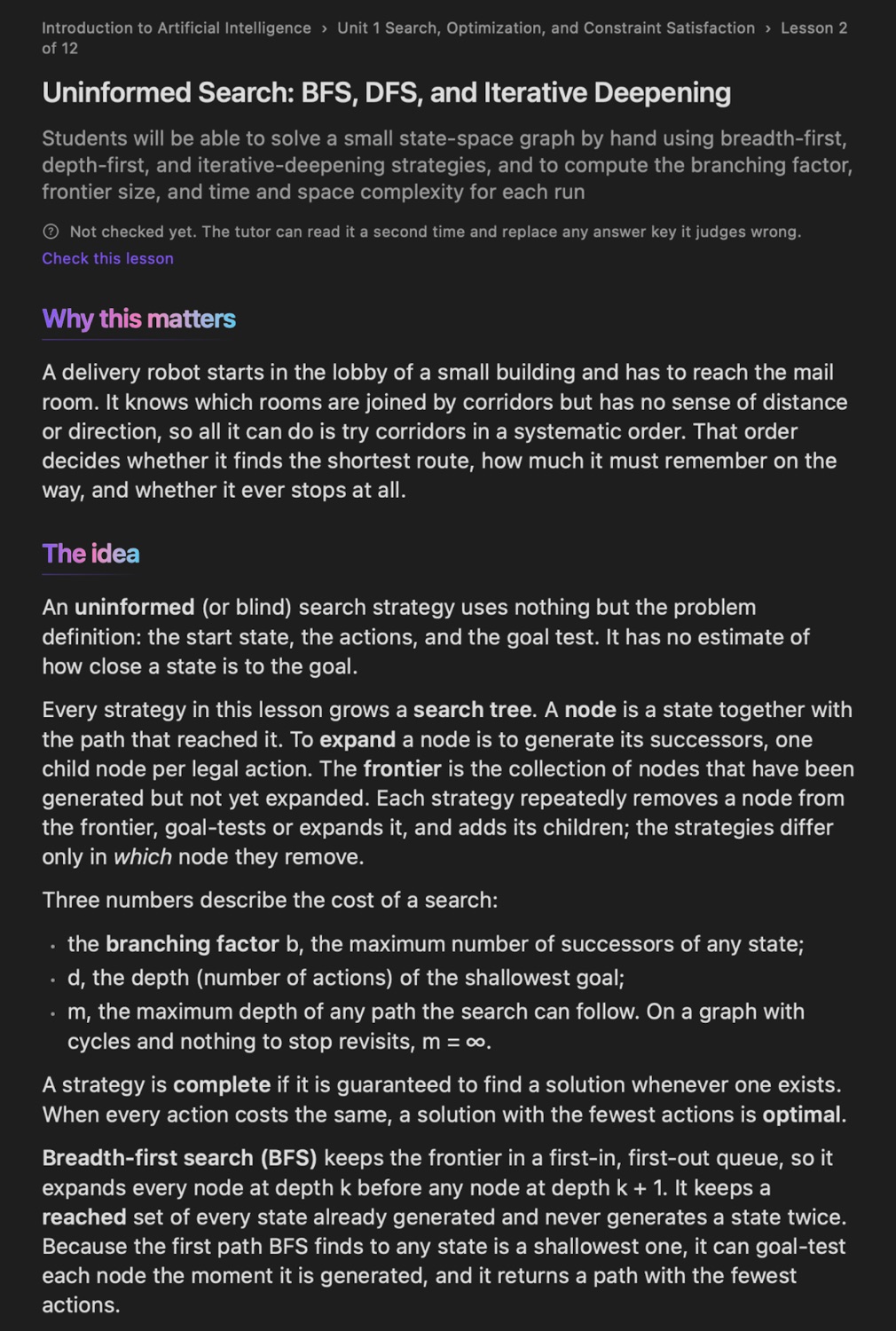
Lesson 2 · excerpt

Uninformed Search: BFS, DFS, and Iterative Deepening

Why this matters

A delivery robot starts in the lobby of a small building and has to reach the mail room. It knows which rooms are joined by corridors but has no sense of distance or direction, so all it can do is try corridors in a systematic order. That order decides whether it finds the shortest route, how much it must remember on the way, and whether it ever stops at all.

The idea

The frontier is the collection of nodes that have been generated but not yet expanded.

Breadth-first search (BFS) keeps the frontier in a first-in, first-out queue, so it expands every node at depth k before any node at depth k + 1. It keeps a reached set of every state already generated and never generates a state twice. Because the first path BFS finds to any state is a shallowest one, it can goal-test each node the moment it is generated, and it returns a path with the fewest actions.

Depth-first search (DFS) keeps the frontier in a last-in, first-out stack, so it always expands the deepest node, diving down one branch and backing up only at a dead end. It goal-tests a node when it pops it and returns the first goal it reaches, which need not be the shallowest.

Worked example

The robot's building has seven rooms, from S (the lobby, the start) to G (the mail room, the goal), joined by eight two-way corridors.

The building as a graphSeven rooms: S, the start, then A, B, C, D, E and G, the goal. Eight two-way corridors: S to A, S to B, A to C, A to D, B to D, B to G, C to E and E to G. Start S, goal G (shaded). Columns are depth from S: 0, 1, 2, 3. S A B C D G E
Corridors: S–A, S–B, A–C, A–D, B–D, B–G, C–E and E–G. G, the goal, is shaded.

The conventions for every run: successors are generated in alphabetical order; DFS pushes them in reverse, so the alphabetically first one lands on top of the stack and is popped first; frontier size is counted at the start and after each expansion; time is counted as the number of goal tests.

Try it yourself

  1. Run BFS from S on the corridor graph with goal E instead of G, using the lesson's conventions. List the states in the order they are goal-tested, and give the largest frontier size.

The outline is real: the app’s tutor planned it on 29 September 2026. The lesson above is an example written for this page, with every trace and answer checked by running it. In the app, the tutor writes each lesson itself.

The same lesson open in the Learning center on the Mac: Uninformed Search, BFS, DFS and Iterative Deepening, with its objective and the sections Why this matters and The idea.
This example lesson, opened in the Learning center on a Mac. When the tutor marks a written exercise, its verdict is a suggestion: your own mark is the grade.

2The next lesson

A lesson takes minutes, the education lasts a lifetime.

1 · Plan

Watch as your lesson gets made.

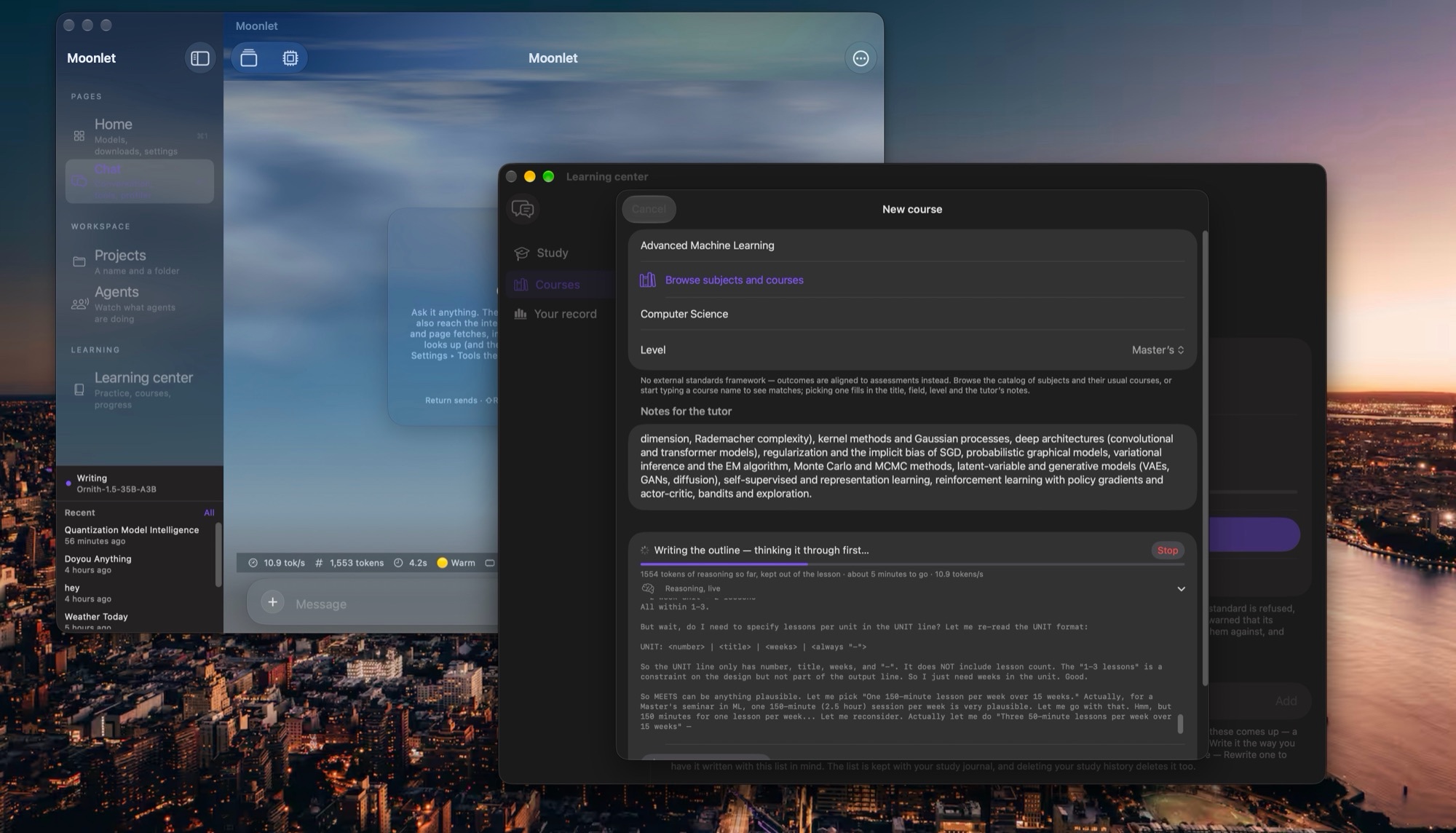
Ask for a course, say Advanced Machine Learning at Master’s level, and watch the tutor reason through the plan live on screen. When the outline is done, the reasoning is set aside and the course stays clean.

1,554 tokens of reasoningabout 5 minutes to go10.9 tokens a second

The Learning center's New course sheet on a Mac: Advanced Machine Learning, Computer Science, Master's level, with the tutor's notes, and below them Writing the outline, thinking it through first, with the reasoning streaming live.

2 · Wait

Written when you reach it.

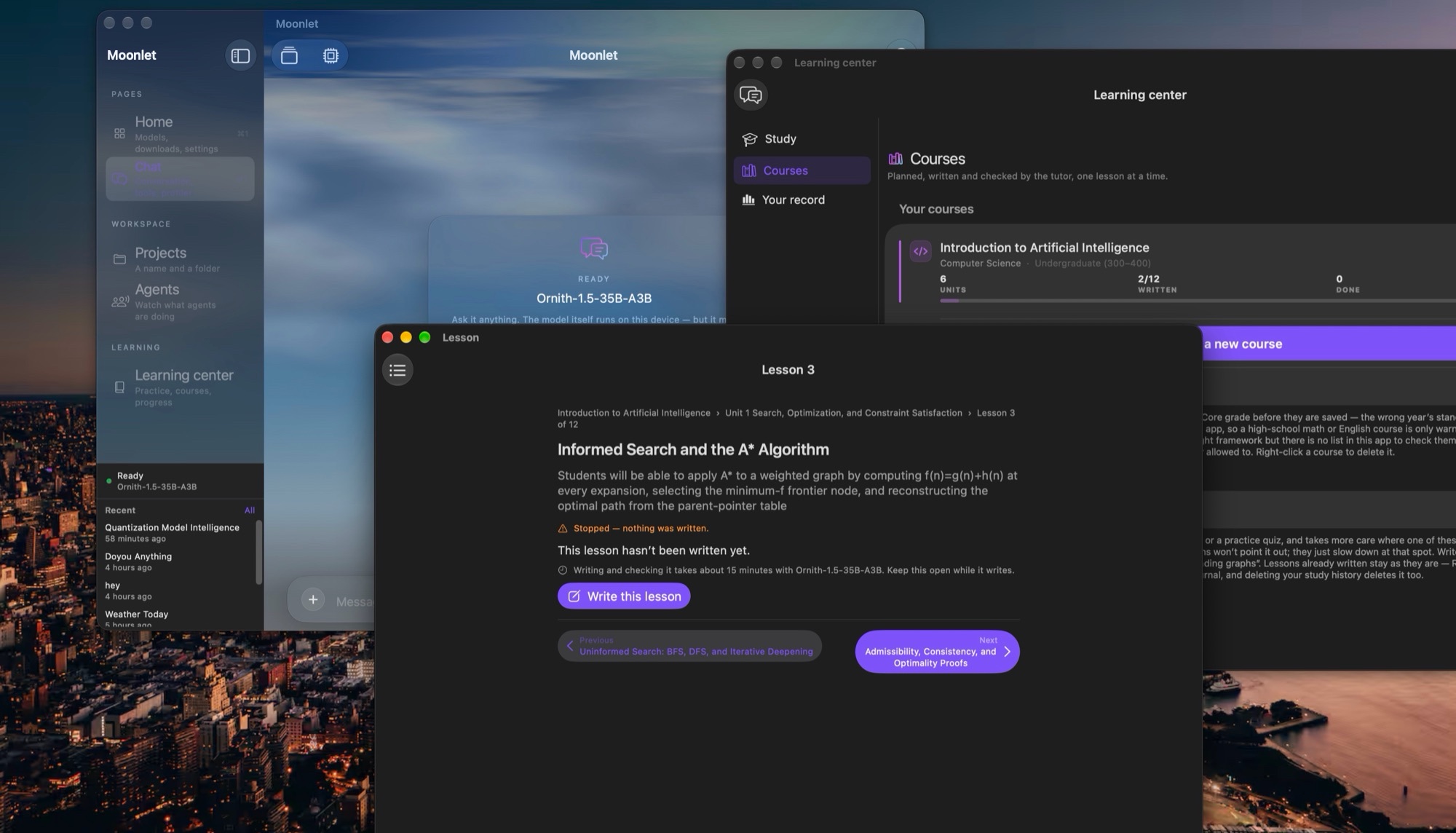
Lesson 3 of Introduction to Artificial Intelligence waits until it’s opened: about 15 minutes to write and check with Ornith-1.5-35B-A3B, the app estimates. Or have a whole unit written overnight.

2 of 12 writtenabout 15 minutes a lesson

Three Moonlet windows on a Mac: the chat window, the Learning center listing Introduction to Artificial Intelligence with 2 of 12 lessons written, and Lesson 3, Informed Search and the A* Algorithm, with its objective and a Write this lesson button.

3 · Write

Written, then read a second time.

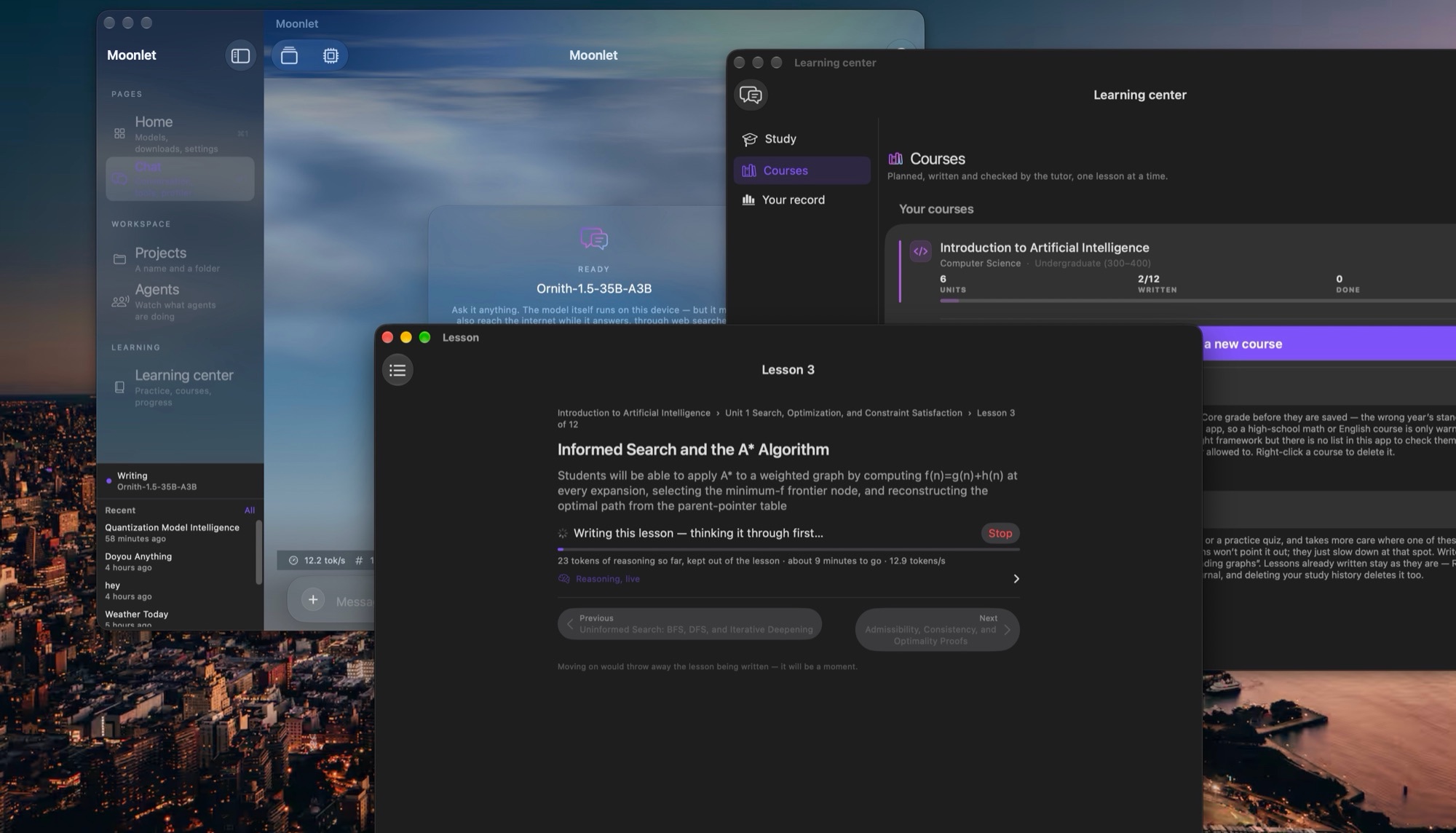
The lesson is written against the same live estimate. Then the tutor reads its own work a second time and replaces any answer key it judges wrong. It is the same model checking itself, so a mistake can still slip through, which is why your own mark is the grade.

about 9 minutes to go12.9 tokens a second

Lesson 3 on a Mac while it is being written: Writing this lesson, thinking it through first, 23 tokens of reasoning so far, kept out of the lesson, about 9 minutes to go at 12.9 tokens a second, with a Stop button.

3Practice, then come back

Practice at the kitchen table. Come back when it’s due.

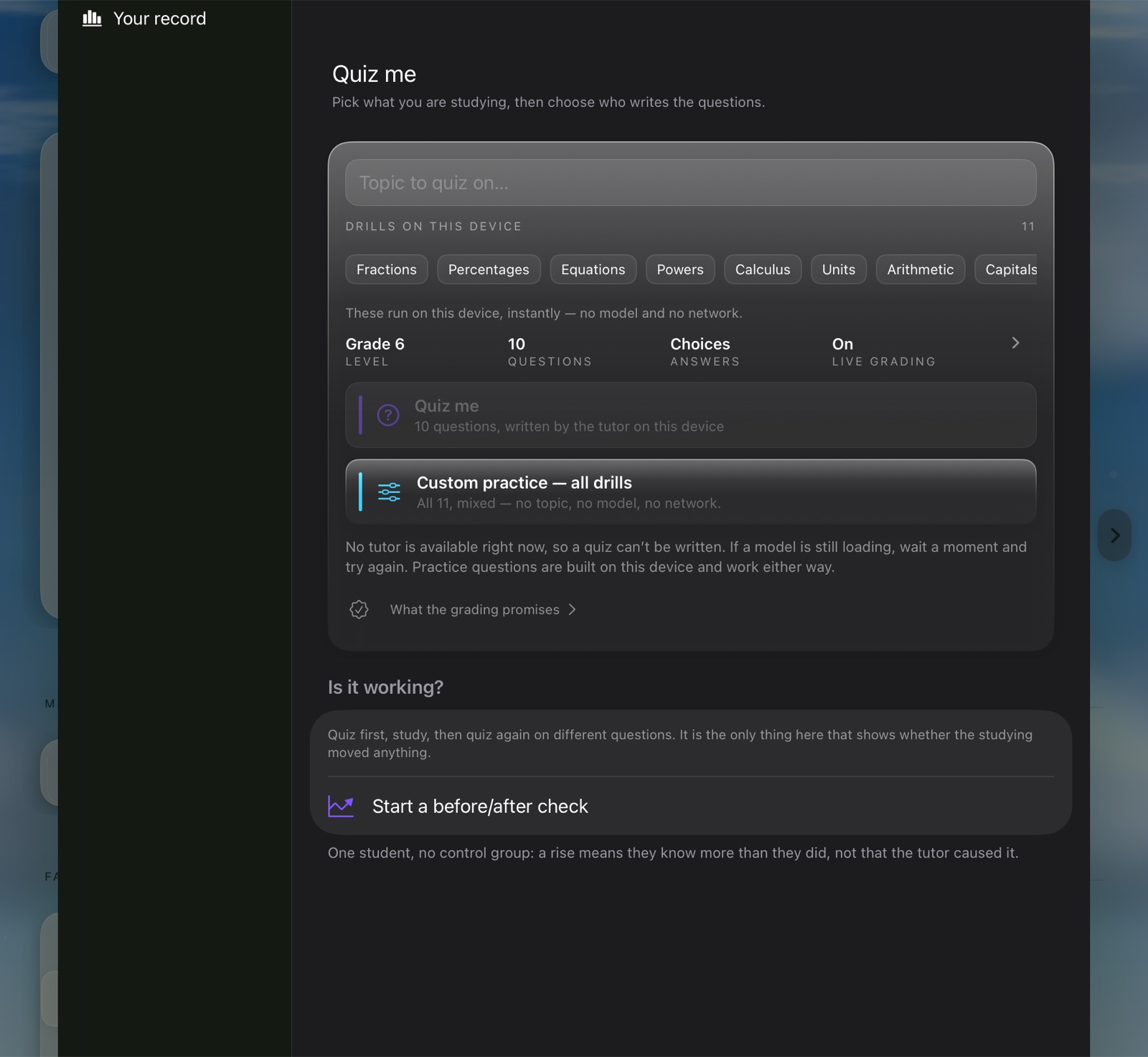
  • Drills, instantly.Eleven drills, from fractions to calculus, start at once, with no model and no network. The app works out each answer itself, so the key is exact, and most wrong options are real slips, like adding the denominators.
  • A quiz on anything.The tutor writes one on any topic, or on your own documents. Its answer keys come from the model, so they are worth a second look; the drills’ keys are worked out by the app.
  • “I have difficulty with…”Write what you find hard, in your own words: “long division”. Lessons slow down at that spot, and practice quizzes add a question on it, quietly, without pointing it out.

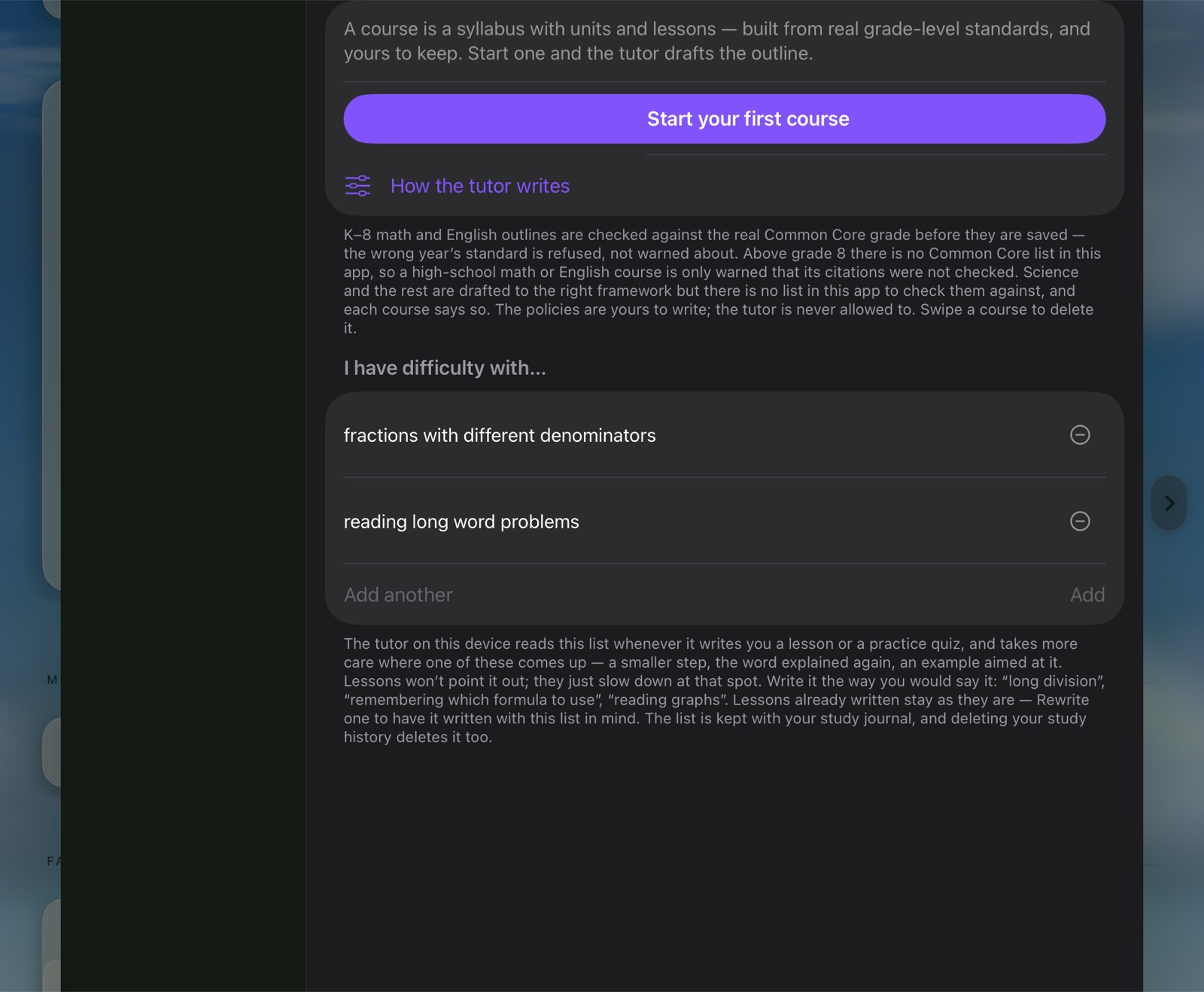
Courses, with the list the tutor reads · Study, with drills that need no model · The college catalog.

Learning center, Courses pane: a button to start a first course, and an I have difficulty with list holding fractions with different denominators and reading long word problems.
Courses, with the list the tutor reads.
Learning center, Study pane: Quiz me, with eleven on-device drills — fractions, percentages, equations, powers, calculus, units, arithmetic and more.
Study: drills that need no model.
Subjects and courses: a catalog of computer science courses from CS 101 Introduction to Programming to CS 420 Compilers, each with its scope.
The college catalog, CS 101 to CS 420.

Tools for learning

A tutor that can look things up and check its work.

Ask a hard question and the tutor can search the web, read your documents or, on a Mac, run code, one step after another, until it has an answer. Each kind of tool has its own switch, so you decide what it can reach, and every call is checked again the moment it runs.

What it can reach

  • Search the webDuckDuckGo, with Mojeek as a fallback. No account or key needed.
  • Your documentsYour PDFs and notes, indexed and searched on the device.
  • Your filesIt works in the folders you grant, and only those.
  • CodeA real shell on a Mac, to run code and check its working. It asks before each command.
  • MemoryRemembers what you teach it across chats, once you turn it on.
  • Settings per modelEach model keeps its own, and a chat can change them for itself.

Children and teens

Careful by default with the youngest learners.

A parent gives each student a profile, and the rules go with it. Child and teen profiles start strict, the tutor is told who it’s talking to, and only a parent can loosen anything.

Hey — I’m really glad you came to talk to me, but I can’t help with that. Harming someone, even when we’re really upset, is never okay, and it’s not something I can be part of.

But I really want to help with what’s really going on. It sounds like your teacher did something that made you feel upset, angry, or maybe hurt. …

And it’s important to know — do you feel safe right now?

Hey, I appreciate you asking me — that’s a fair question! But the way the private parts of a person’s body work is something grown-ups usually talk about with kids in person, like a parent, a grandparent, or a doctor. So that’s something I’d suggest you ask a grown-up you trust. 🙂

… Is there something from your homework we could work on together right now?

Two real replies on a test student profile, on an iPhone, shortened but not reworded. The students’ questions are blurred.
  • Spoken to at their levelWith a child, the tutor keeps things simple and gently turns down adult or frightening topics, pointing to a parent or a grown-up they trust. With a teen, it stays age-appropriate without talking down. Both are pitched at the grade you set.
  • Replies checked before they showOn child and teen profiles, every reply, in chat and in the Learning center, is checked for sexual content, self-harm, weapons and drugs. A match is held back with a short note, and for self-harm, where to get help. In a teen’s private chat, the few words a health class uses are let through. It catches plain wording, not every paraphrase: a safeguard, not a guarantee.
  • Only models a parent allowsChild and teen profiles chat only with the models a parent has switched on. Official releases from established labs start on. A model made to drop its safety training, to role-play or to write adult content is marked Not for students before a parent downloads it, and starts off. A model a parent left loaded is put away when a student takes over, and a student who needs one can ask a parent from the chat.
  • No web, no cloudChild and teen profiles get no web search and no pictures from the web, and can’t use a cloud account for lessons.
  • Homework mode from day oneOn for every student profile: the tutor guides instead of handing over finished answers, and on a Mac its code runner stays off.
  • Only a parent loosens the rulesA less restricted profile, homework mode off, a higher course level: each asks for the parent PIN. Model settings, model training and Groupthink are never on a student profile.
  • When in doubt, the strictest rulesIf the app can’t tell who’s using it, or can’t read the family settings, a child’s rules apply. A forgotten parent PIN can’t be reset with the device passcode while a child or teen profile is in use.
  • Private questions for teensA teen can ask about sex, relationships, or whatever is worrying them in a private chat: answered on the device, not saved, and not shown to a parent. The exceptions are shown before they start. Suicide, self-harm or saying they’ve hurt someone tells a parent at once that their teen needs support, and why — never what they wrote; asking for help hurting someone, about explosives or weapons, extremist views, or for a romance with the AI gets two warnings, then the same alert. One thing outranks both: if a teen says an adult who looks after them is hurting or frightening them, no one in the family is told, and they’re shown helplines outside the family instead. A parent can turn private questions off.
  • Parents can seeOn a shared device, a parent can open every profile’s chats, apart from a teen’s private questions. A linked student device sends the parent’s device a study summary: subjects, time studied and quiz scores.
  • Nothing comes to usThe model runs on your devices, and no information about a student is sent to us.

These features lower the chance of something unsuitable reaching a student; they can’t rule it out. Parents and guardians stay in charge. The privacy policy’s section on families and students has the details.

Where your words go

The model runs here.

What stays here

Messages, photos, documents and taught facts stay in the app, not uploaded. Answers come from your device’s own chip, unless you link a student to the family Mac on your Wi-Fi or choose a cloud account for lessons.

On a shared device, a parent or adult profile can read every profile’s chats; students see only their own. A teen’s private questions are never saved; the safety rule they were shown can tell a parent that they need support, never what they wrote.

Local has a cost: a model too big to stay in memory streams from the SSD and replies more slowly.

What goes out, and when

  • Hugging Face. Searching for models in the app sends your search words there, and downloading one sends the name of the model you tap.
  • Web tools. Full tool autonomy is on at install: the model may search the web (your search terms go to DuckDuckGo, or Mojeek as a fallback, or Brave Search first if you add your own key), search papers (OpenAlex and arXiv, then Crossref), fetch a page, look up an image on Wikimedia Commons, or, on a Mac, get a stock price from a finance provider. Each kind of tool has a switch.
  • Services you add. MCP servers, and chain endpoints on a Mac, receive the requests the model makes to them.
  • Shell, on a Mac. The model may run shell commands, and a command can reach the internet too. It asks before each one unless you turn that off.
  • Lesson research. The Learning center may search the web before writing a lesson, with its own switch; profiles without web never do.
  • A cloud account, if you choose one. The Learning center can write lessons with a cloud provider instead. Then lessons, quizzes, the answers you type for marking and passages of the documents you quiz yourself on go to that provider.
  • The family link. A student’s device can be linked to the family Mac on your Wi-Fi. The linked parent’s or teacher’s device gets a study summary and, with Answer for their device on, the student’s typed questions and written quiz answers, to be answered there, encrypted on your Wi-Fi.
  • Groupthink. Pools memory with a nearby device, so a model is split across both. If it’s turned on (never on a student profile), it announces this device and its free memory on your local network, then sends model layers and each token’s working data to the other device, unencrypted.

Everything else is in the privacy policy and the terms of use.

Moonlet is in development

Hear when it’s ready.

Write to us and we’ll send one email when Moonlet ships. Nothing else, and we delete your address when you ask. How we handle it.

Write to be notified hello@moonlitlabai.com